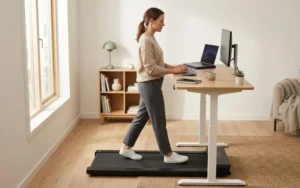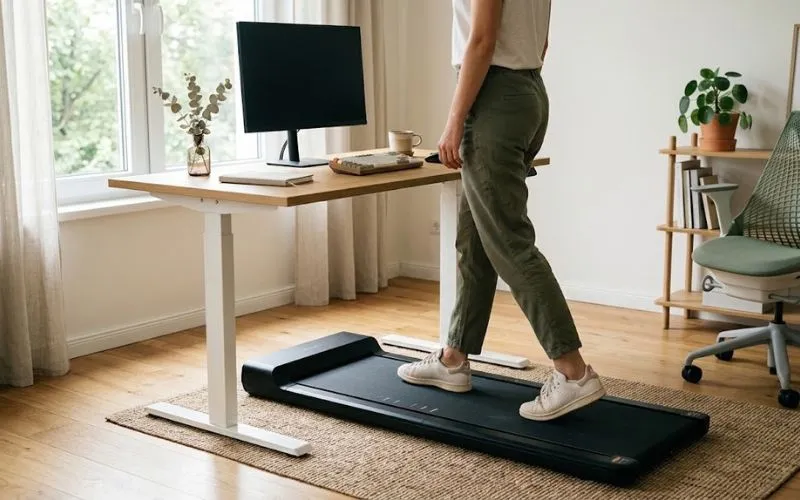
Before you buy an under-desk treadmill, check seven things. The big ones: can your desk rise high enough, does the treadmill slide under it, can it walk slowly, and is it quiet on calls. The rest are controls, handle choice, and desk stability.
Each check below comes with a way to test it before you buy. This guide doesn’t rank products. Picks live in our separate best under-desk treadmills guide, linked at the end.
How to read this guide: it’s a buying guide, not a test report, so it has no hands-on measurements. Each figure comes from a named source, is labeled as an estimate, or is simple arithmetic. My advice marks opinion.
Disclosure: some links on this page may be affiliate links. If you buy through them, we may earn a commission at no extra cost to you. As an Amazon Associate I earn from qualifying purchases.
Quick answer: what to look for in an under-desk treadmill
- A step-up height your desk’s maximum height can cover.
- A deck and motor hood low enough to clear your desk’s lowest setting.
- A minimum speed around 1 mph or lower (my suggested guideline, not a standard).
- Quiet footfall, not just a low decibel number.
- Controls that still work without one specific app.
- A handle choice that suits your space and balance.
- A desk that stays steady while you walk.
In this guide: treadmill types · desk fit · deck and hood height · speed range · controls and handle · noise on calls · stability and secondary specs · checklist · FAQ
Under-desk treadmill, walking pad, or treadmill desk?
These labels overlap and are used loosely. Here is how they’re commonly used:
- Under-desk treadmill: a low-profile belt built to sit under a desk, typically with a modest top speed.
- Walking pad: the informal name for the same idea, commonly foldable and often handleless.
- Treadmill desk: a desk and treadmill sold or built together.
- 2-in-1 or 3-in-1: a walking pad with a removable or fold-up handle that turns it into a conventional treadmill, often with a higher top speed.
This guide is for machines you pair with a desk you already own. Running is a different category: TechRadar’s two-year ownership piece says an under-desk treadmill of any kind isn’t for runners, though some 2-in-1 models are built for higher speeds, so check the spec sheet if that matters to you.
Will it fit your desk?
Short answer: it fits if your desk can rise high enough to cover the treadmill’s step-up. In my view, that’s the number that matters most. Standing on a deck lifts you by the thickness of the treadmill, so your keyboard has to rise by the same amount.
What do you need to measure?
- Highest setting: floor to the top of the desktop at its maximum height.
- Lowest setting: floor to the underside of the lowest crossbar or frame, with the desk at its minimum.
- Width between the legs or lifting columns, and the position of any crossbar.
- Your elbow height: stand in your walking shoes, bend your elbow to 90 degrees, and measure floor to elbow.
What is step-up height?
Step-up height is how far the walking surface sits above the floor. LifeSpan, a company that sells treadmill desks, says in its buying guide that most under-desk treadmill bases have a step-up of about 5 to 6 inches. Other brands may differ, so rely on the spec sheet for the model you’re considering.
How high does your desk need to go?
Rule of thumb: your desk should reach your elbow height (measured in walking shoes) plus the treadmill’s step-up. People differ, so treat it as a starting point.
Measuring beats estimating. If you want a rough number, a rule of thumb puts your standing elbow height at about 63% of your height. I haven’t checked that ratio against a published source.
The table below is illustrative only. It uses that ratio and assumes about an inch for shoe soles and a 5 to 6 inch step-up. It can’t account for how bodies differ.
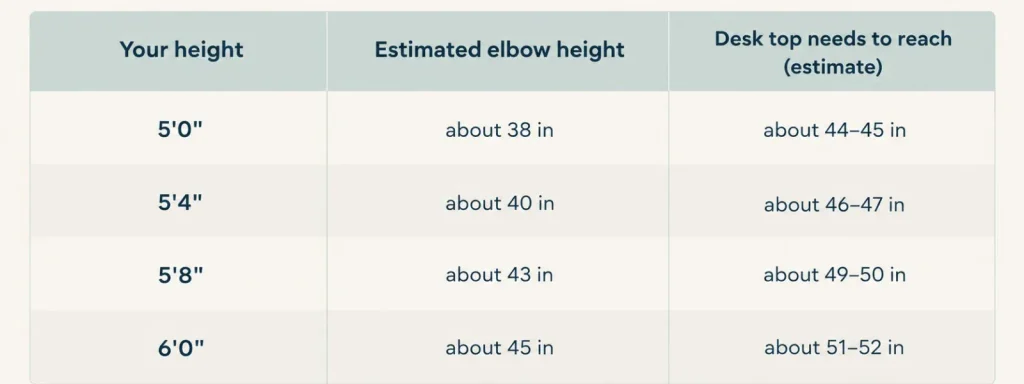
A worked example. As a hypothetical, say you’re about 5’8″ and your measured elbow height is 43 inches. With a 6 inch step-up, your desk needs to reach about 49 inches.
If your desk tops out at 47, you’re two inches short. Your keyboard will sit lower than ideal whenever you walk.
If you come up short, your options are a taller desk, an extender if your desk’s maker sells one, or a treadmill with a lower step-up. Maximum desk heights vary by model, so check your own spec sheet before assuming you have room.
My advice: measure your desk’s maximum before you look at a single treadmill. It’s the one number that can rule a whole category out.
Will your desk setup work?
- Electric standing desk with a crossbar. Check two things: the maximum height against the rule of thumb above, and whether the crossbar sits low enough to block the front of the treadmill.
- Sit-stand converter on a regular desk. Add your desk’s surface height to how far the converter lifts the keyboard platform, then compare that total to the height you need. Converters with a small lift may fall short.
- Fixed-height desk. Often built for seated use, so the surface may be too low once you’re standing on a deck. An adjustable desk or a converter may be needed.
Will the treadmill slide under your desk?
Short answer: only if your desk’s lowest setting clears the motor hood, which can be taller than the deck.
The deck is the walking surface. The motor hood is the housing over the motor, and on some models it’s taller than the rest of the unit. If your desk’s lowest setting sits below that hood, the treadmill may not slide forward or park underneath.
| Feature | Front-hood design | Full-width deck |
|---|---|---|
| Walking surface | May have a raised section at the front | Even from front to back |
| Sliding under a desk | Needs room for the hood | Can be easier |
| What to ask the brand | The hood height, not just the deck height | The overall unit height |
This is a general comparison, not a rule, and designs vary by model.
How do you find the hood height?
- Check the spec sheet for a height or thickness figure, and note whether it describes the deck or the hood.
- Look at product photos that show a hand, a shoe, or a ruler for scale.
- Ask the brand’s support team for the number, and ask for it in writing.
My advice: don’t buy against a measurement the listing won’t give you. A missing hood height is a reason to ask, not a reason to guess.
What speed should you walk at while working?
Short answer: try about 1 to 2.5 mph. That’s my suggested starting range, not a cited standard, and comfort varies by person. Start slower than you think you need to and build up.
Does top speed matter?
TechRadar’s long-term reviewer says the top speed of most under-desk treadmills sounds low but is actually quite fast for walking. In my view, a higher top speed tells you little about whether a machine suits typing and calls.
Why does minimum speed matter?
In my view, typing and video calls are easier at a slow, steady pace, though your comfort may differ. Look for the minimum speed on the spec sheet and how finely you can adjust it. A machine whose slowest setting is faster than you can comfortably type at may not suit desk work.
How do mph and km/h compare?
Some spec sheets list km/h. These rounded conversions help:
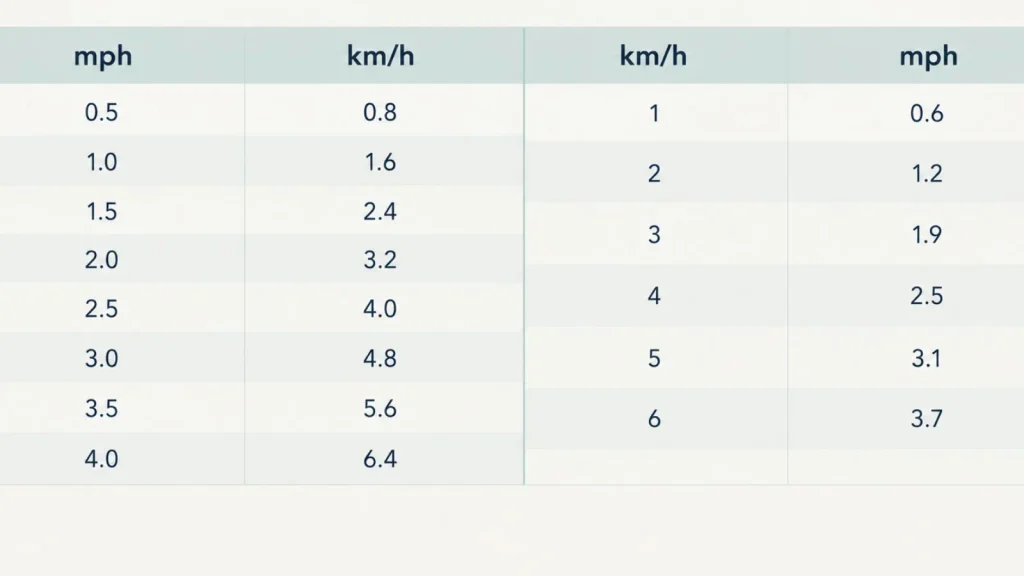
A listing that says 0.6–6 km/h covers about 0.4 to 3.7 mph.
My advice: pick a machine whose minimum speed is around 1 mph or lower. A listing that advertises top speed and skips the minimum is leaving out the number that may matter most.
Which controls should you look for?
Short answer: in my view, the control method matters less than what happens when it fails. Ask what you can still do if the remote dies or your phone isn’t nearby.
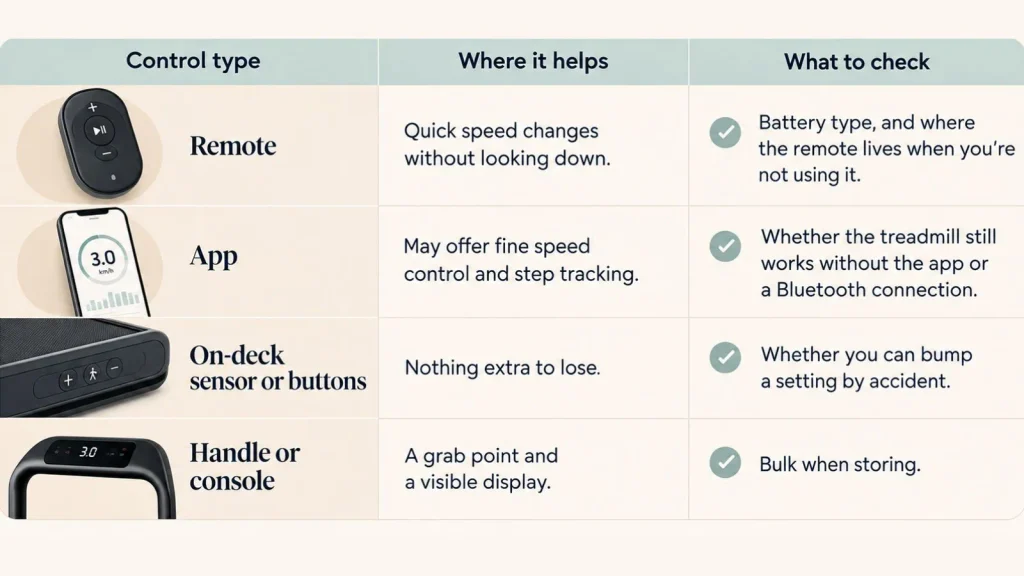
Those are things worth checking, not claims about how often any of them fail.
Do you need a handle?
One buying guide says under-desk treadmills have collapsible handles or no handles at all. A handle gives you something to steady yourself on but adds bulk to store. The same guide notes that desk treadmills lack the handrails of a traditional treadmill and recommends a model that stops the belt when it detects you’ve stepped off.
My advice: if you’re confident on your feet and short on space, a handleless model is reasonable. If balance is a concern, or you have a health condition, talk to your doctor or physical therapist before choosing. This isn’t medical advice.
Will an under-desk treadmill be too loud on calls?
Short answer: it depends, and the decibel number on the listing doesn’t settle it. Three different sounds can reach your microphone.
- Motor hum: the sound of the motor itself.
- Footfall thump: the rhythm of your steps hitting the belt and deck.
- Floor transmission: vibration traveling through the floor into your desk legs and up to a desk-mounted mic.
Why isn’t the decibel number enough?
One buying guide suggests looking for a sound level under 50 dB for the quietest operation. Check whether a listing says how its number was measured: at what speed, at what distance, with what flooring.
Decibels also climb fast, so a small gap on paper can be a bigger jump than it looks. And a motor-only figure may say nothing about thump.
How do you test noise at home?
Noise is hard to judge from a listing, so confirm the return window before you buy. Then:
- Record a test call at your normal walking speed.
- Play it back and listen for rhythmic thumping.
- Repeat with an anti-vibration mat under the treadmill.
- Repeat with the mic moved off the desk: a boom arm or a headset.
- If you rent above someone else, ask them whether they hear it.
My advice: if the recording shows thump rather than hum, try an anti-vibration mat and a headset or boom-arm mic before you blame the treadmill. A mic that doesn’t sit on the desk may pick up less vibration.
Will your desk stay steady, and where do you plug it in?
Desk stability. A desk that feels solid when you sit can feel different when you’re walking beside it. Tall, fully extended desks can wobble more. Test by typing at your walking speed with the desk at the height you’ll actually use.
Cables. Leave enough slack for the desk’s full height range, and keep cords away from the belt and deck.
Outlets. One buying guide advises against extension cords with treadmills and suggests having a grounded outlet within reach of the power cord. Follow your manual, which overrides general advice.
Wheels. TechRadar’s reviewer says never to buy one without wheels. It’s an opinion, but a reasonable one if you plan to move the machine in and out of storage.
What other specs should you check?
- Motor power: ask whether the horsepower number is continuous or peak. Peak numbers are higher and may say less about everyday use.
- Weight capacity: the maker’s stated limit. My suggestion: if you’re near it, look for models rated well above your weight.
- Deck size: compare belt length and width against your stride and foot size.
- Warranty: check how long it lasts, what it covers (motor, belt, parts, labor), and who pays for shipping on a repair.
Which spec-sheet claims should you question?
These phrases are illustrative, not quotes from specific listings.
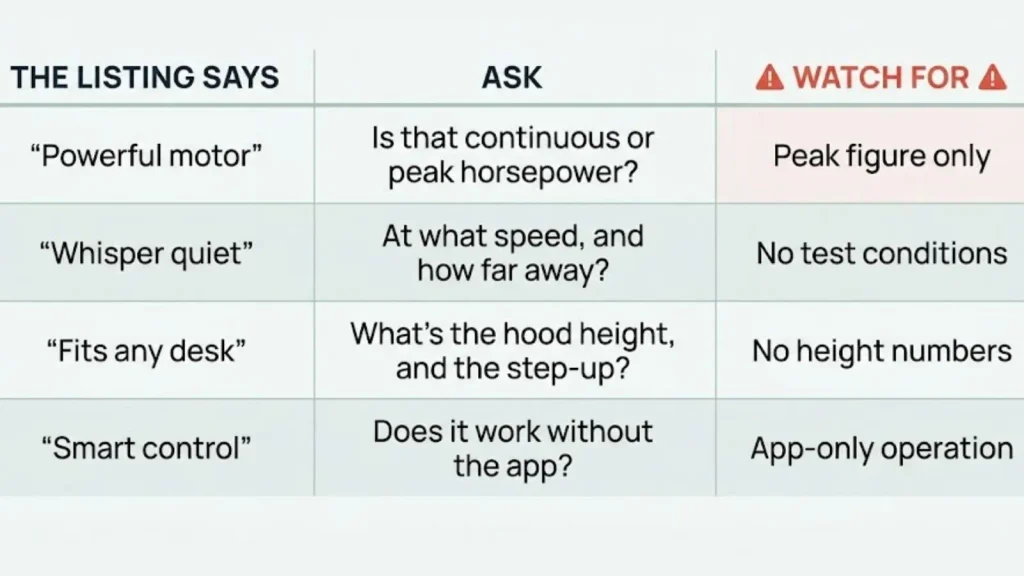
What should you check before you buy?
- Desk maximum height and minimum height
- Width between legs, and crossbar position
- Your elbow height in walking shoes
- Treadmill step-up and hood height from the spec sheet
- Minimum speed, in mph
- Control backup if the remote or app fails
- Handle or no handle, and a stop-when-you-step-off feature
- Return window, for the noise test
- Grounded outlet within reach
- Floor type and a plan for a mat
Screenshot this before you shop.
Frequently asked questions
What should I look for in an under-desk treadmill?
Check that your desk rises high enough for the treadmill’s step-up, and that the deck and motor hood clear your desk’s lowest setting. Then look for a minimum speed around 1 mph or lower, quiet footfall, controls that work without one app, a handle choice that suits you, and a steady desk.
How much clearance does an under-desk treadmill need?
Two clearances matter. Your desk must rise high enough to cover the step-up, which LifeSpan’s guide puts at about 5 to 6 inches for most bases. Its lowest setting must also clear the motor hood if you want to slide the unit under, and the hood can be taller than the deck, so ask for that number.
What speed should I walk while working?
Try about 1 to 2.5 mph. That’s my suggested starting range, not a cited standard, and comfort varies by person. Start slow, and check the minimum speed, since a treadmill that can’t go slow enough is hard to type on.
Are under-desk treadmills quiet enough for video calls?
Sometimes. Quiet motors help, but footsteps traveling through the floor and desk can be what your mic picks up, and listed decibel figures may not say how they were measured. A recorded test call at your own walking speed is a practical check, so confirm the return window first.
Do I need a handle?
Not necessarily. A handle adds stability but also bulk, and many models have a fold-down handle or none at all. Without rails, look for a feature that stops the belt when you step off, and if balance is a concern, check with your doctor or physical therapist first (this isn’t medical advice).
Will an under-desk treadmill work with a standing desk converter?
Often, if the math works. Add your desk’s surface height to the converter’s maximum lift, then compare the total to the height you need after adding the step-up. Tall users and converters with a small lift can fall short.
Can I use an extension cord with an under-desk treadmill?
Generally not. One buying guide advises plugging into a grounded outlet within reach of the power cord. Check for an outlet near your desk before you buy, and follow the manufacturer’s manual, which overrides general advice.
What’s the difference between an under-desk treadmill and a walking pad?
They’re largely the same category. “Walking pad” is the informal name, commonly used for foldable, low-profile models, often without a handle. Neither is a standard, so compare the specs (speed range, step-up, noise, controls) rather than the label.
Where should you start?
Start with three checks: measure your desk’s maximum height against the step-up, get the hood height in writing, and confirm the return window so you can run the call test at home. Those are the problems I’d least want to discover after the box arrives.