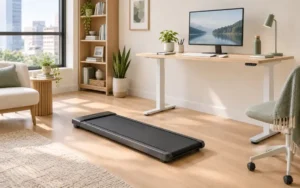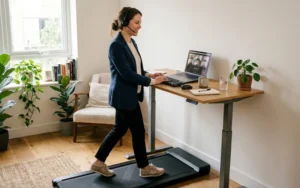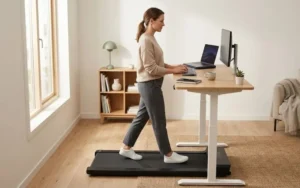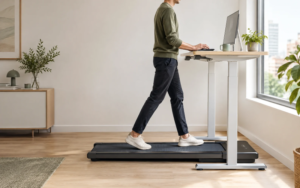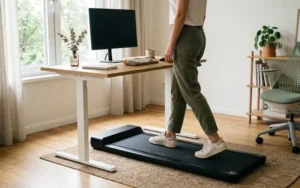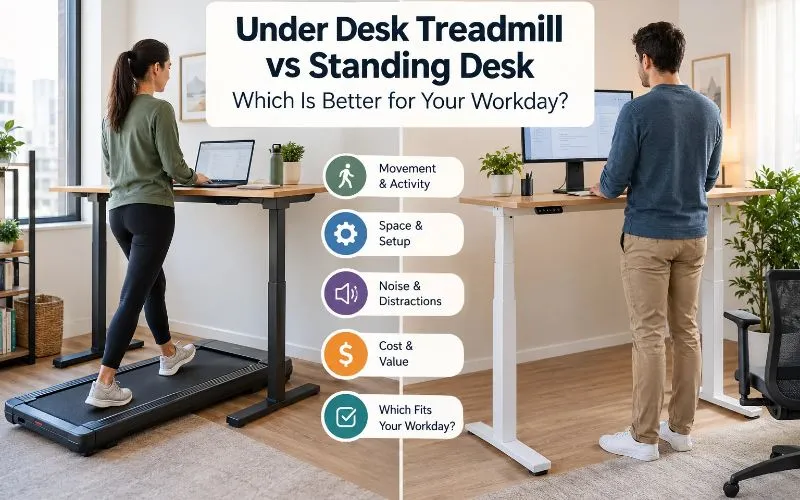
Choose a standing desk if most of your day is detailed typing, video calls, or work in a small room. Choose an under-desk treadmill if you have floor space, a desk that works at standing height, and mostly routine tasks like email, reading, or audio calls.
If you can afford both, use them together. Walk during easy tasks. Stand or sit for precise ones.
These two products aren’t substitutes. A walking pad adds movement, and a standing desk adds a working position. A walking pad also needs a desk that works at standing height, which is easy to overlook.
How Do an Under-Desk Treadmill and a Standing Desk Compare?
| Feature | Under-desk treadmill | Standing desk |
|---|---|---|
| What it adds | Walking during suitable tasks | An upright working position |
| Typing and mouse work | May take time to adjust | No walking motion to deal with |
| Video calls | Motor noise and footsteps may be distracting | Usually simpler |
| Floor space | Operating and storage space | Depends on the desk’s footprint |
| Noise | Motor and footsteps may be audible | No treadmill motor (electric height-adjustment motors, if present, run only while the desk moves) |
| Extra equipment | A work surface that fits | A chair, if you also want to sit |
This table shows general differences, not results from hands-on testing. Actual noise, comfort, stability, and space needs depend on the equipment and the room.
Can You Use a Walking Pad With Your Current Desk?
Probably not if it’s a regular seated desk. A desk that works when you sit is likely too low once you stand on a treadmill deck.
An under-desk treadmill, often called a walking pad, is a compact treadmill made mainly for walking. Some models fit beneath a desk. To check your desk:
- Find the deck height on the manufacturer’s spec sheet.
- Add it to the desk height you’d use when standing on the floor. That total is how high your desk needs to go.
- Confirm the desk is stable and that your keyboard and monitor still work at that height.
- For a fixed-height desk, check its actual dimensions. For an adjustable desk, make sure its range covers standing on the deck.
What Does a Standing Desk Add?
A standing desk raises your work surface so you can work upright. Fixed-height models keep you standing. Adjustable sit-stand models let you switch, and you can still use a chair for tasks that suit sitting.
A standing desk adds no treadmill movement or motor noise. But it doesn’t make a workstation comfortable on its own, and standing still isn’t the same as walking.
Which Tasks Can You Do While Walking?
Start with low-demand tasks. Routine email, familiar documents, and light reading are reasonable first tries on a walking pad.
Detailed spreadsheets, careful data entry, editing, design, and mouse-heavy work need steady hand movement. Some people find walking hurts their accuracy or speed on these tasks.
Calls are a separate case. A walking pad can add motor noise and footstep sounds to a video call, and your camera may pick up your movement. Audio-only meetings may be easier, especially when you’re listening rather than presenting or taking detailed notes.
Which Setup Fits Each Task?
This Workday Compatibility Matrix is a practical guide from our editors. It isn’t a medical assessment or the result of hands-on testing.
| Work task or constraint | Under-desk treadmill | Standing desk |
|---|---|---|
| Routine email and light reading | Worth considering at a comfortable pace | A straightforward option |
| Precision typing and detailed data entry | Walking may be distracting | No walking motion to deal with |
| Complex writing or analysis | Pause walking if it gets in the way | Useful if standing is comfortable |
| Audio-only meetings | May work if noise is acceptable | Usually simpler |
| Video calls | Check microphone and camera setup | Usually simpler |
| Very limited floor space | Needs operating and storage space | Often easier to fit |
| Noise-sensitive apartment | Motor and footstep noise need thought | Avoids treadmill motor noise |
| Limited budget | Needs a treadmill and a suitable work surface | Depends on whether your current desk works at standing height |
How Can You Test Your Own Tasks?
Test one type of task at a time. Neither setup guarantees better focus, so don’t assume.
- Start at a slow, comfortable pace.
- Try one type of task at a time.
- Compare how it goes while walking, standing, and sitting.
- For precision work, use something measurable, such as a typing exercise.
- Judge the quality of your work, not the minutes you spent on the equipment.
- If walking gets in the way, slow down or stop for that task.
Walking vs Standing: What Are the Health Trade-Offs?
Does Walking Burn More Calories Than Standing?
Yes, walking generally uses more energy than standing still. The amount depends on walking speed, body size, and how long you walk.
That alone doesn’t settle which to buy. A treadmill only helps if you can use it comfortably and consistently during your real tasks.
Neither device is a guaranteed weight-loss solution.
Does a Standing Desk Reduce Sitting Time?
Only if you use it. An adjustable desk you never raise changes nothing, and a walking pad that doesn’t fit your tasks will sit idle.
How your time splits between positions depends on actual use. The goal is more chances to change position, not one workstation that replaces all the others.
Is Standing or Walking Better for Discomfort?
Neither is better for everyone. Staying in one position for a long time can become uncomfortable, whether you sit, stand, or walk. Responses vary from person to person.
If a setup causes persistent pain, numbness, dizziness, or other concerning symptoms, stop using it and seek professional advice. Don’t push through.
Which Setup Works Better in a Small Apartment?
A standing desk is often easier to fit. It adds no moving belt and no separate treadmill storage plan.
A walking pad needs room to run and room to step on and off safely. Advertised dimensions are only part of the picture.
How Much Space Does a Walking Pad Need?
Before buying, measure three things:
- Operating footprint: The floor area it takes up while in use.
- Access and clearance: Room to step on and off, walk without obstruction, and keep furniture out of the way.
- Storage footprint: The space it needs when not in use, if the manufacturer allows your planned storage method.
Don’t assume a foldable walking pad will fit under a bed or stand upright in a closet. Check its size, weight, folding design, and storage instructions.
Will a Walking Pad Be Too Loud for Neighbors?
It might be. Walking pads can make motor noise and footstep sounds that carry in shared buildings. The amount depends on the machine, speed, floor, footwear, and building construction.
If you share walls or floors, check the manufacturer’s noise information and return policy. Look for independent measurements when you can. A “quiet” label in marketing copy doesn’t guarantee a treadmill will suit calls or apartment living.
Small-space verdict: If you can’t comfortably fit the treadmill, its clearance, and its storage, choose the standing desk first. In a very small room, it avoids adding another piece of floor equipment.
For more on equipment, see our guide to the best walking pads for apartments.
How Much Does Each Setup Cost?
It depends on what you already own. Compare the cost of each complete setup, not two advertised prices.
If you already have a desk that works comfortably at standing height, you may be able to start without buying a new one. If your current desk can’t work at standing height, an adjustable desk adds to the total.
A walking pad may need both the treadmill and a suitable work surface. You may also need accessories, storage, or changes to your workspace.
| Cost consideration | Standing desk | Under-desk treadmill |
|---|---|---|
| Main purchase | Fixed-height or adjustable desk | Walking pad |
| Existing furniture | A suitable desk may already be available | A suitable work surface is usually needed |
| Additional requirements | Chair if you also want to sit | Enough operating space and safe access |
| Storage | Depends on desk design | May need separate storage when not in use |
| Ongoing considerations | Desk stability and adjustment mechanism | Maintenance, belt condition, and warranty coverage |
Before you buy either one, check current prices, delivery costs, warranty terms, return conditions, and the manufacturer’s specs. If a walking pad is the better fit, use our best under-desk treadmills guide to compare options.
Which Setup Should You Choose?
You spend most of the day on detailed computer work. Start with a standing desk or an adjustable sit-stand desk. Schedule walking separately instead of forcing yourself to walk during every task.
You spend hours on routine tasks and audio calls. A walking pad is worth considering if you have the desk space and can work comfortably while walking. Start with one task that doesn’t need constant precision. Check comfort, noise, and work quality before adding more.
You rent a small apartment on a limited budget. You don’t need to buy either product right away. Look at your current workstation, find chances to change position, and take regular breaks away from your desk. If you buy later, measure the space and check fit first.
You want the most flexible setup. If budget and room allow, pair an adjustable sit-stand desk with a walking pad. You can then sit, stand, or walk in different work blocks. You don’t need to use every mode all the time.
How Do You Set Up a Comfortable Workstation?
Your keyboard, monitor, desk, and posture need to work together, whichever equipment you choose. The U.S. Occupational Safety and Health Administration (OSHA) publishes computer workstation resources on topics like monitor placement, keyboard position, and working posture. See OSHA’s computer workstation and ergonomics resources.
Before using a standing desk or walking pad, check these points:
- Keyboard and mouse: Keep your shoulders relaxed and your wrists comfortable.
- Monitor: Set the screen at a comfortable height and distance.
- Desk height: Match it to your working position, including the added height of a treadmill deck.
- Stability: Make sure the desk is stable and suits your setup.
- Walking clearance: Follow the treadmill maker’s safety instructions and keep the area clear.
- Adjustment: Ease into a new setup, and change positions when you need to.
Frequently Asked Questions
Is an under-desk treadmill better than a standing desk?
Neither is better for everyone. A treadmill adds walking during suitable tasks, while a standing desk lets you work upright without walking motion. Your tasks, budget, space, and comfort decide which fits.
Can you use a walking pad without a standing desk?
Only if your work surface is high enough for you to stand on the deck. A typical seated desk may be too low. Check the desk’s height, stability, keyboard position, and monitor position before you start.
Which is better for typing?
A standing desk is often the simpler choice for precision typing, since you don’t have to deal with walking motion. A walking pad may suit some routine tasks. Check whether it affects your accuracy, comfort, or focus.
Can you use an under-desk treadmill during Zoom calls?
Possibly. Motor noise, footsteps, microphone pickup, and camera movement may make it hard. Test your actual setup before relying on it for meetings.
Can you combine a walking pad and a standing desk?
Yes, if the desk is stable, its height range works with the treadmill deck, and the full setup is safe to use. Check the fit and safety instructions for both products.
What Should You Do Before Buying?
Don’t buy yet if you’re unsure. Run three checks:
- List the tasks you could realistically do while walking.
- Measure your space.
- Check whether your desk can reach standing height with a treadmill deck under your feet.
These checks will show whether you need a desk, a walking pad, or neither. When a walking pad fits, compare options in our best under-desk treadmills guide and best walking pads for apartments.